


IIUM Template
W3CRM - Bootstrap Admin Dashboard Template
This documentation is last updated on 12 December 2023
Quick Start -
Get started by including IIUM Template CSS and JavaScript in your project.
  <!-- FAVICONS ICON -->
  <link rel="shortcut icon" type="image/png" href="https://style.iium.edu.my/images/iium/iium-logo.png">
  <!-- Style css -->
  <link href="https://style.iium.edu.my/css/style.css" rel="stylesheet">
  <link href="https://style.iium.edu.my/css/iium.css" rel="stylesheet">
  <!-- FONTS -->
  <link href="https://fonts.googleapis.com/css2?family=Material+Icons" rel="stylesheet">
  <!-- BOOTSTRAP SELECT -->
  <link href="https://style.iium.edu.my/vendor/bootstrap-select/dist/css/bootstrap-select.min.css" rel="stylesheet">
  <!-- SCRIPTS -->
  <script src="https://style.iium.edu.my/vendor/global/global.min.js"></script>
	<script src="https://style.iium.edu.my/js/custom.js"></script>
	<script src="https://style.iium.edu.my/js/deznav-init.js"></script>
	<script src="https://style.iium.edu.my/vendor/bootstrap-select/dist/js/bootstrap-select.min.js"></script>
Folder Directories -
| images | This folder contains all the images of W3CRM template. |
| fonts | This folder font files for various template features. |
| css | This folder contains all the CSS files of W3CRM template. |
| js | This folder has all javascript files for various template features. |
| vendor | This folder has all plugins used in the template. |
Step-by-Step Manual for Creating an IIUM Template (HTML Page) -
1.- Create HTML Page
IIUM Template consists of:
| <!DOCTYPE html> | This statement tells the browser the type and version of HTML in use. It helps the browser understand how to interpret the HTML document. |
| <head> | This section contains meta-information about the HTML document, such as the character set, viewport settings, and the title of the page. It also provides a location to link external stylesheets and scripts. |
| <body> | This tag encloses the main content of the HTML document. |
| Preloader Section | This area features a loading screen or spinner visible on a webpage while its content is loading. |
| Wrapper Section | Wrapper provide the stucture to control the layout and appearance of the main content section. |
| Navigation Header Section | Contains the header section of the webpage, often used for the main heading or banner. |
| Header Section | Contains the header section of the webpage, often used for the main heading or banner. |
| Sidebar Section | In this section, you'll discover a sidebar separate from the main content area, displaying links to other pages. |
| Breadcrumb Section | This section contains breadcrumbs appearing near the top of a webpage, forming a trail of links showing the path from the homepage to the current page. |
| Footer Section | Contains the footer section of the webpage. |
<!DOCTYPE html>
<html>
<head>
<!-- PAGE TITLE -->
<title>IIUM Template</title>
<!-- FAVICONS ICON -->
<link rel="shortcut icon" type="image/png" href="https://style.iium.edu.my/images/iium/iium-logo.png">
<!-- Style css -->
<link href="https://style.iium.edu.my/css/style.css" rel="stylesheet">
<link href="https://style.iium.edu.my/css/iium.css" rel="stylesheet">
<!-- FONTS -->
<link href="https://fonts.googleapis.com/css2?family=Material+Icons" rel="stylesheet">
<!-- BOOTSTRAP SELECT -->
<link href="https://style.iium.edu.my/vendor/bootstrap-select/dist/css/bootstrap-select.min.css" rel="stylesheet">
</head>
<body>
<div class="background-image"></div>
<!-- Preloader start -->
<div id="preloader">
<div class="lds-ripple">
<div></div>
<div></div>
</div>
</div>
<!-- Preloader end -->
<!-- Main wrapper start -->
<div id="main-wrapper">
<!-- Navigation Header start -->
<!-- Navigation Header end -->
<!-- Header start -->
<!-- Header end -->
<!-- Sidebar start -->
<!-- Sidebar end -->

<!-- Begin Page Content -->
<div class="content-body">
<!-- Breadcrumb start -->
<!-- Breadcrumb end -->

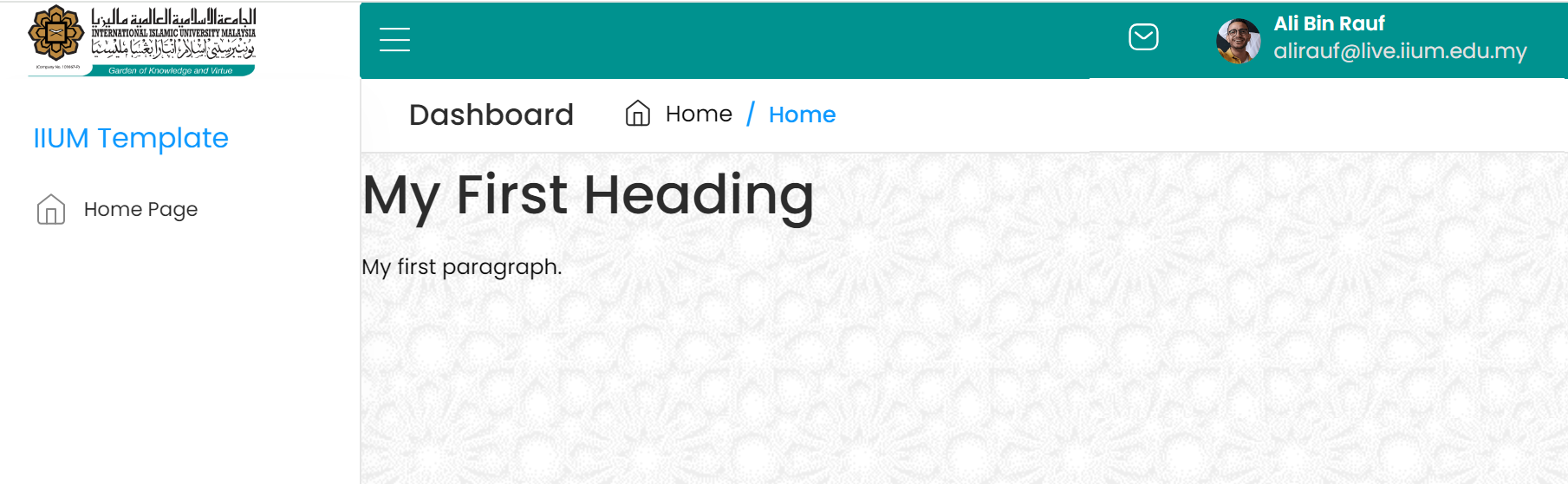
<h1>My First Heading</h1>
<p>My first paragraph.</p>

</div>
<!-- End of Page Content -->

<!-- Footer start -->
<!-- Footer end -->

</div>
<!-- Main wrapper end -->
<!-- SCRIPTS -->
<script src="https://style.iium.edu.my/vendor/global/global.min.js"></script>
<script src="https://style.iium.edu.my/js/custom.js"></script>
<script src="https://style.iium.edu.my/js/deznav-init.js"></script>
<script src="https://style.iium.edu.my/vendor/bootstrap-select/dist/js/bootstrap-select.min.js"></script>
</body>
</html>
The output will be:

2.- Navigation Header Section
	<div class="nav-header">
    <a href="index.html" class="brand-logo">
        <img src="https://style.iium.edu.my/images/iium/iium-logo-v2.png" class="user_img" style="max-width: 75%"
            alt="" />
    </a>
    <div class="nav-control">
        <div class="hamburger">
            <span class="line"></span>
            <span class="line"></span>
            <span class="line"></span>
        </div>
    </div>
</div>
3.- Header Section
	<div class="header">
    <div class="header-content">
        <nav class="navbar navbar-expand">
            <div class="collapse navbar-collapse justify-content-between">
                <div class="header-left"></div>
                <ul class="navbar-nav header-right">
                    <li class="nav-item dropdown notification_dropdown">
                        <a class="nav-link bell-link" href="javascript:void(0);">
                            <svg width="20" height="22" viewBox="0 0 22 20" fill="none" xmlns="http://www.w3.org/2000/svg">
                                <path
                                    d="M16.9026 6.85114L12.4593 10.4642C11.6198 11.1302 10.4387 11.1302 9.59922 10.4642L5.11844 6.85114"
                                    stroke="white" stroke-width="1.5" stroke-linecap="round" stroke-linejoin="round" />
                                <path fill-rule="evenodd" clip-rule="evenodd"
                                    d="M15.9089 19C18.9502 19.0084 21 16.5095 21 13.4384V6.57001C21 3.49883 18.9502 1 15.9089 1H6.09114C3.04979 1 1 3.49883 1 6.57001V13.4384C1 16.5095 3.04979 19.0084 6.09114 19H15.9089Z"
                                    stroke="white" stroke-width="1.5" stroke-linecap="round" stroke-linejoin="round" />
                            </svg>
                        </a>
                    </li>
                    <li class="nav-item ps-3">
                        <div class="dropdown header-profile2">
                            <a class="nav-link" href="javascript:void(0);" role="button" data-bs-toggle="dropdown"
                                aria-expanded="false">
                                <div class="header-info2 d-flex align-items-center">
                                    <div class="header-media">
                                        <img src="https://style.iium.edu.my/images/iium/profile.png" alt="" />
                                    </div>
                                    <div class="header-info">
                                        <h6>Ali Bin Rauf</h6>
                                        <p>alirauf@live.iium.edu.my</p>
                                    </div>
                                </div>
                            </a>
                            <div class="dropdown-menu dropdown-menu-end" style="">
                                <div class="card border-0 mb-0">
                                    <div class="card-header py-2">
                                        <div class="products">
                                            <img src="https://style.iium.edu.my/images/iium/profile.png" class="avatar avatar-md" alt="" />
                                            <div>
                                                <h6>Ali Bin Rauf</h6>
                                                <span>2312456</span>
                                            </div>
                                        </div>
                                    </div>
                                    <div class="card-body px-0 py-2">
                                        <a href="#" class="dropdown-item ai-icon">
                                            <svg width="20" height="20" viewBox="0 0 24 24" fill="none"
                                                xmlns="http://www.w3.org/2000/svg">
                                                <path fill-rule="evenodd" clip-rule="evenodd"
                                                    d="M11.9848 15.3462C8.11714 15.3462 4.81429 15.931 4.81429 18.2729C4.81429 20.6148 8.09619 21.2205 11.9848 21.2205C15.8524 21.2205 19.1543 20.6348 19.1543 18.2938C19.1543 15.9529 15.8733 15.3462 11.9848 15.3462Z"
                                                    stroke="var(--primary)" stroke-width="1.5" stroke-linecap="round"
                                                    stroke-linejoin="round" />
                                                <path fill-rule="evenodd" clip-rule="evenodd"
                                                    d="M11.9848 12.0059C14.5229 12.0059 16.58 9.94779 16.58 7.40969C16.58 4.8716 14.5229 2.81445 11.9848 2.81445C9.44667 2.81445 7.38857 4.8716 7.38857 7.40969C7.38 9.93922 9.42381 11.9973 11.9524 12.0059H11.9848Z"
                                                    stroke="var(--primary)" stroke-width="1.42857" stroke-linecap="round"
                                                    stroke-linejoin="round" />
                                            </svg>

                                            <span class="ms-2">Profile </span>
                                        </a>
                                    </div>
                                    <div class="card-footer px-0 py-2">
                                        <a href="#" class="dropdown-item ai-icon">
                                            <svg class="profle-logout" xmlns="http://www.w3.org/2000/svg" width="18" height="18"
                                                viewBox="0 0 24 24" fill="none" stroke="#ff7979" stroke-width="2" stroke-linecap="round"
                                                stroke-linejoin="round">
                                                <path d="M9 21H5a2 2 0 0 1-2-2V5a2 2 0 0 1 2-2h4"></path>
                                                <polyline points="16 17 21 12 16 7"></polyline>
                                                <line x1="21" y1="12" x2="9" y2="12"></line>
                                            </svg>
                                            <span class="ms-2 text-danger">Logout </span>
                                        </a>
                                    </div>
                                </div>
                            </div>
                        </div>
                    </li>
                </ul>
            </div>
        </nav>
    </div>
</div>
The output will be:

4.- Sidebar Section
	<div class="deznav">
    <div class="deznav-scroll">
        <ul class="metismenu" id="menu">
            <li class="menu-title" style="font-size: 16px">IIUM Template</li>
            <li>
                <a href="index.html" class="mm-active" aria-expanded="false">
                    <div class="menu-icon">
                        <img src="https://style.iium.edu.my/images/iconly/light/Home.svg"/>
                    </div>
                    <span class="nav-text">Home Page</span>
                </a>
            </li>
        </ul>
    </div>
</div>
The output will be:

5.- Breadcrumb Section
	<div class="page-titles">
		<ol class="breadcrumb">
			<li>
				<h5 class="bc-title">Dashboard</h5>
			</li>
			<li class="breadcrumb-item"><a href="javascript:void(0)">
					<svg width="17" height="17" viewBox="0 0 17 17" fill="none" xmlns="http://www.w3.org/2000/svg">
						<path
							d="M2.125 6.375L8.5 1.41667L14.875 6.375V14.1667C14.875 14.5424 14.7257 14.9027 14.4601 15.1684C14.1944 15.4341 13.8341 15.5833 13.4583 15.5833H3.54167C3.16594 15.5833 2.80561 15.4341 2.53993 15.1684C2.27426 14.9027 2.125 14.5424 2.125 14.1667V6.375Z"
							stroke="#2C2C2C" stroke-linecap="round" stroke-linejoin="round" />
						<path d="M6.375 15.5833V8.5H10.625V15.5833" stroke="#2C2C2C" stroke-linecap="round"
							stroke-linejoin="round" />
					</svg>
					Home </a>
			</li>
			<li class="breadcrumb-item active"><a href="javascript:void(0)">Home</a></li>
		</ol>
	</div>
The output will be:
6.- Footer Section
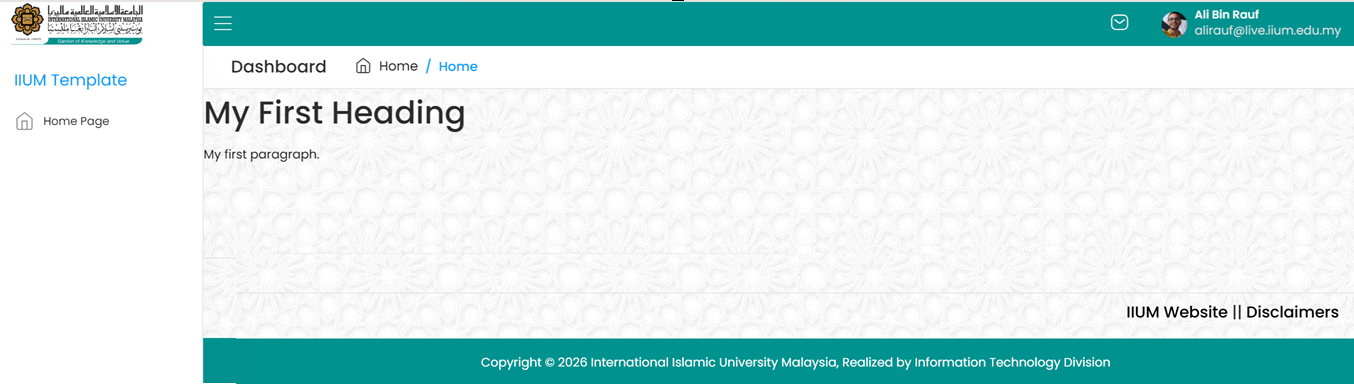
	<div class="footer">
		<div class="row mt-2 mb-2">
			<div class="col-md-6 iium-footer">
				<h4>
					<a href="https://www.iium.edu.my" target="_blank" class="iium-href">IIUM Website</a> ||
					<a href="https://www.iium.edu.my/v2/disclaimer" target="_blank" class="iium-href">    Disclaimers</a>
				</h4>
			</div>
		</div>
		<div class="copyright">
			<p>Copyright © 2026 International Islamic University Malaysia, Realized by Information Technology Division</p>
		</div>
	</div>
The output will be:
IIUM Logo Image -
1.- IIUM Full Logo Tawhidic
https://style.iium.edu.my/images/iium/IIUM_LOGO_ELEMENTS_TAWHIDIC_FULL_COLOUR-1536x205.png

2.- IIUM Full Logo Award 40
https://style.iium.edu.my/images/iium/IIUM-LOGO-AWARD.png

3.- IIUM Full Logo
https://style.iium.edu.my/images/iium/IIUM_FULL_LOGO-1536x215.png

4.- IIUM Logo
https://style.iium.edu.my/images/iium/IIUM_FULL_LOGO_ORI-768x225-1.png

Framework Installation -
1.- To get an IIUM template, open and log in to IIUM GitLab Click Here.
IIUM Template provides three projects consisting of Basic HTML, Laravel, and Yii2 Frameworks.
2.- Choose the project.
a) Basic HTML
https://gitlab.iium.edu.my/ora2pg/iiumhtml
b) Laravel Framework
https://gitlab.iium.edu.my/ora2pg/iiumlaravel
c) Yii2 Framework
https://gitlab.iium.edu.my/ora2pg/iiumyii2
3.- Clone the project to your local environment.
For example, if you choose Basic HTML;
git clone git@gitlab.iium.edu.my:ora2pg/iiumhtml.git
4.- Remove .git folder
To avoid conflicts with your project repository, kindly delete the .git folder.